


TheFrog: Weather app
4.6750.00 Reviews
App Specs
- Version
- 10.6.0
- Updated On
- License
- Free
- Downloads
- 1,000,000+
- Developer
- Giovesoft
- Categories
- Weather
- Platform
- Android
Screenshots
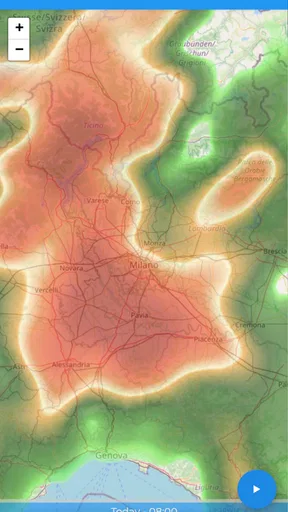
 Analysis by AppCompare
I usually want a weather app to answer a practical question quickly: should I take a coat, change my route, or move an outdoor plan? TheFrog takes a lighter approach to that everyday job, using a frog-themed presentation to make checking conditions feel less like reading a dashboard. I find that warmth appealing, as long as the playful design doesn’t get in the way of the forecast.
Trust starts with what you can actually assess
Weather information can influence ordinary decisions, but checking a forecast also involves a phone app interacting with your device. I judge that relationship cautiously: I look for clear choices on screen and avoid assuming that a friendly character tells me anything about the app’s privacy practices. A cheerful look is a design choice, not proof of how information is handled.
That distinction matters especially for location. A forecast tied to where I am can be more useful than one for a broad region, but precise location is also personal information. Before enabling location access in any weather app, I consider whether I need automatic local results or would rather choose a place myself. I recommend making that decision deliberately, rather than tapping through prompts just to reach the forecast.
Making location choices work for your routine
If you mainly check the weather at home, selecting a location manually can be a sensible habit when that option is available. If your day involves moving between neighborhoods, automatic location may save time, but it is worth checking the device’s permission controls and choosing the access level you are comfortable with. I treat those as practical phone settings to review, not as evidence of a particular policy or a promise about what the app does behind the scenes.
Notifications deserve the same attention. Weather alerts are useful when a storm could affect a commute or an outdoor commitment; frequent or irrelevant alerts can quickly become noise. I’d keep only the notifications I expect to act on, and I’d use the phone’s notification settings if I wanted to quiet them. That simple filter makes an alert more meaningful because it is less likely to get lost among routine pings.
Who will enjoy the frog-led approach
TheFrog is a weather app from giovesoft, and its character-led presentation is its clearest point of difference. The app is free to download, with in-app purchases listed from $0.99 to $5.49 per item. It is rated for Everyone, which makes its light visual style easy to understand as part of the app’s appeal, though that rating is not a measure of forecast quality or privacy.
I can see it suiting someone who wants a quick, approachable check before walking the dog, heading to a bus stop, or deciding whether to bring an umbrella. It may also work well for people who find dense weather screens tiring and prefer a more playful first glance. If you already rely on a detailed meteorological service, though, a characterful interface may be a pleasant extra rather than a reason to replace your main source.
Worth Reading Before You Choose

EA SPORTS FC Mobile 26 Is a Bigger Football Game, but It Takes Time

Flipboard Shows What News Apps Must Do Beyond the Feed

Switching to Android Auto Means Rethinking Your Driving Routine

Google Calendar Makes a Crowded Week Easier to Manage

Ludo King Makes the Most of the Minutes Between Plans

Baby Panda World Brings Quick Play to Modern Phones, but Its Game Library Feels Busy
A realistic check before leaving home
Imagine I’m about to leave for work and the sky looks unsettled. I’d open the app, check the current conditions and the forecast for the hours ahead, then decide whether to pack rain gear or alter my departure. The useful habit is to look at the time window that matches the decision, not just the day’s headline. A chance of rain later in the day does not necessarily mean I need an umbrella for a short trip now.
For plans that depend heavily on weather, I’d treat any single app as a guide rather than a guarantee. Conditions can change, and forecasts are not certainty. If the decision has higher stakes—such as a long drive, a hike, or an event that cannot easily be moved—I’d compare another trusted forecast and check again closer to departure. That is a sensible safeguard for any weather app, not a special flaw of this one.
Where it differs from familiar weather apps
Many weather apps prioritize dense maps, multiple measurements, or a utilitarian list of conditions. TheFrog’s appeal is more about making the everyday check feel friendly. That can be a genuine advantage when I want a quick answer without navigating a crowded interface. The trade-off is that people who want extensive radar interpretation, specialist observations, or a highly configurable forecasting workspace may be better served by a tool built around those needs.
I would not choose a weather app solely because its character is amusing, and I would not dismiss it for the same reason. The useful comparison is whether its presentation helps me notice and act on the information I need. If I’m checking conditions several times a day, an interface I enjoy opening can make a routine easier; if I need technical depth, visual charm cannot substitute for it.
Reading the store record in context
The app has a 4.6 average from around 29,000 ratings, with more than 1 million installs. Those figures suggest that it has found a substantial audience, but popularity alone cannot tell me whether its forecast is the right fit for my area or habits. I’d use the rating as a reason to consider trying it, then judge the experience by whether the information is clear and useful in my own routine.
It was released on August 10, 2020, and the current version is 10.2.1, with Android 8.0 as the minimum operating system requirement. Those details help establish basic compatibility, but they do not guarantee identical performance across devices. I’d make sure my phone meets the requirement and keep the app updated through the usual store controls if I decide to use it.
Questions worth settling before relying on it
One practical question is whether I need to create an account. I would check the screens shown during setup and avoid entering personal details unless the app clearly requires them for something I want to use. I also wouldn’t assume that social sharing or community content is essential to the basic act of checking the weather; I’d focus first on the forecast experience and leave optional interactions aside if they do not suit me.
Another question is whether the app can serve as my only forecast source. For casual decisions, it may be enough if its presentation gives me the information I need. For travel, outdoor work, or plans where changing conditions matter a great deal, I’d compare it with a second source. This is less about distrust than good judgment: forecasts are estimates, and different services can present conditions in different ways.
Finally, I’d consider whether the free version meets my needs before spending on any optional purchase. The listed in-app purchase range is $0.99 to $5.49 per item, so I would check what a purchase offers in the app before deciding. If the basic experience already answers my everyday questions, there may be no reason to pay; if a particular extra is useful, I’d weigh that against how often I would actually use it.
First Impressions Matter
Weather apps. We all have one, but have you ever come across one that’s as quirky and fun as TheFrog? I took this app for a spin, and here's what I found.
Features That Stand Out
One of the coolest features is the app’s ability to provide hyper-local weather updates. Thanks to the GPS functionality, it pinpoints your exact location and gives you real-time forecasts. You’ll never be caught in the rain unprepared again!
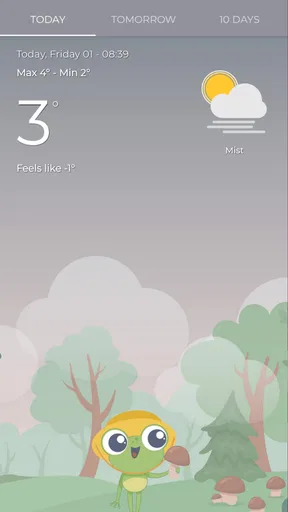
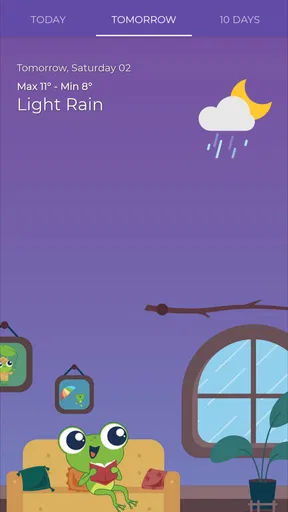
Moreover, the app includes detailed hourly forecasts. I found this particularly handy when planning my day. The frog's animated expressions change with the weather, so you always know when it’s time to pack an umbrella or slap on some sunscreen.
Weather Alerts and Customization
TheFrog doesn’t just stop at basic weather info. It sends timely alerts for severe weather conditions. I got a heads-up about an unexpected thunderstorm, which saved my weekend plans. You can also customize these alerts to suit your preferences, ensuring you only get the notifications that matter to you.
The customization options extend to the app's appearance too. You can switch between different themes and choose how the data is displayed. I found it easy to tailor the app to fit my needs, which isn’t always the case with other weather apps.
Data Accuracy and Reliability
A weather app is only as good as its data, right? I compared TheFrog’s forecasts with a couple of other popular weather apps, and it held up pretty well. The data is sourced from reliable meteorological agencies, ensuring you get accurate weather updates. I didn’t experience any major discrepancies, which was reassuring.
Social and Sharing Features
What’s a modern app without a touch of social interaction? TheFrog allows you to share weather updates with friends and family via social media. It’s not just practical; it’s a fun way to keep everyone in the loop. Plus, the app includes a community section where users can share photos of the weather in their area. It’s a neat addition that adds a bit of social flair to the app.
Battery Usage and Performance
No one likes an app that drains your battery, right? Thankfully, TheFrog runs efficiently without hogging too much power. I noticed it barely made a dent in my battery life, even with the GPS tracking and frequent updates. The app runs smoothly, and I didn’t encounter any crashes or glitches during my time using it.
So, is TheFrog worth downloading? In my book, absolutely. It’s not only a reliable weather source but also a delightful companion to have on your phone. Whether you’re planning a day out or just curious about the weather, this app keeps things light and entertaining while still delivering the information you need. Give it a try and see if you don’t find yourself smiling along with your new froggy friend.
Pros
- Accurate weather predictions every hour.
- User-friendly interface with clear visuals.
- Customizable alerts for severe weather.
- Global coverage with detailed local data.
- Minimal ad interference for free users.
Cons
- Limited widget options for home screens.
- No offline mode for weather updates.
- High battery usage when location tracking.
- Premium features locked behind paywall.
- Occasional slow loading times on startup.
FAQs for TheFrog: Weather app
What features does TheFrog: Weather app offer?
TheFrog: Weather app provides real-time weather updates, detailed forecasts, interactive radar maps, and severe weather alerts. It also includes customizable widgets and a clean, intuitive interface for easy navigation. Users can personalize notifications for specific weather events and access weather data for multiple locations globally.
Is TheFrog: Weather app free to use?
The basic version of TheFrog: Weather app is free and provides essential weather information and forecasts. However, there is a premium version available that unlocks additional features such as ad-free usage, advanced radar options, and more detailed forecast data for a small subscription fee.
How accurate are the weather forecasts in TheFrog: Weather app?
TheFrog: Weather app utilizes data from reliable meteorological sources and employs sophisticated algorithms to provide accurate forecasts. While no weather prediction can be 100% accurate, TheFrog aims to deliver the most precise information by updating its data frequently and using real-time weather models.
Can I use TheFrog: Weather app without an internet connection?
While TheFrog: Weather app requires an internet connection to update the latest weather information and forecasts, it does store recent data locally. This means you can still access the most recent updates you've downloaded even without an active connection, although live updates and real-time alerts won't be available offline.
Does TheFrog: Weather app support multiple languages?
Yes, TheFrog: Weather app supports a variety of languages to cater to its global user base. Users can easily switch languages in the app settings, making it accessible to non-English speakers who wish to receive weather forecasts and updates in their preferred language.


